
How to Get a Replacement P60: The Complete UK Guide
Misplaced the one document your mortgage broker, letting agent, or tax credit renewal keeps asking for? You're not alone — a lost P60 is one of the most common paperwork headaches for UK employees. The good news is that getting a replacement P60 is usually straightforward once you know who to ask and what to say. This guide walks you through exactly how to request a replacement P60 from your employer, what to do if that's not possible, and how HMRC can help fill the gap.
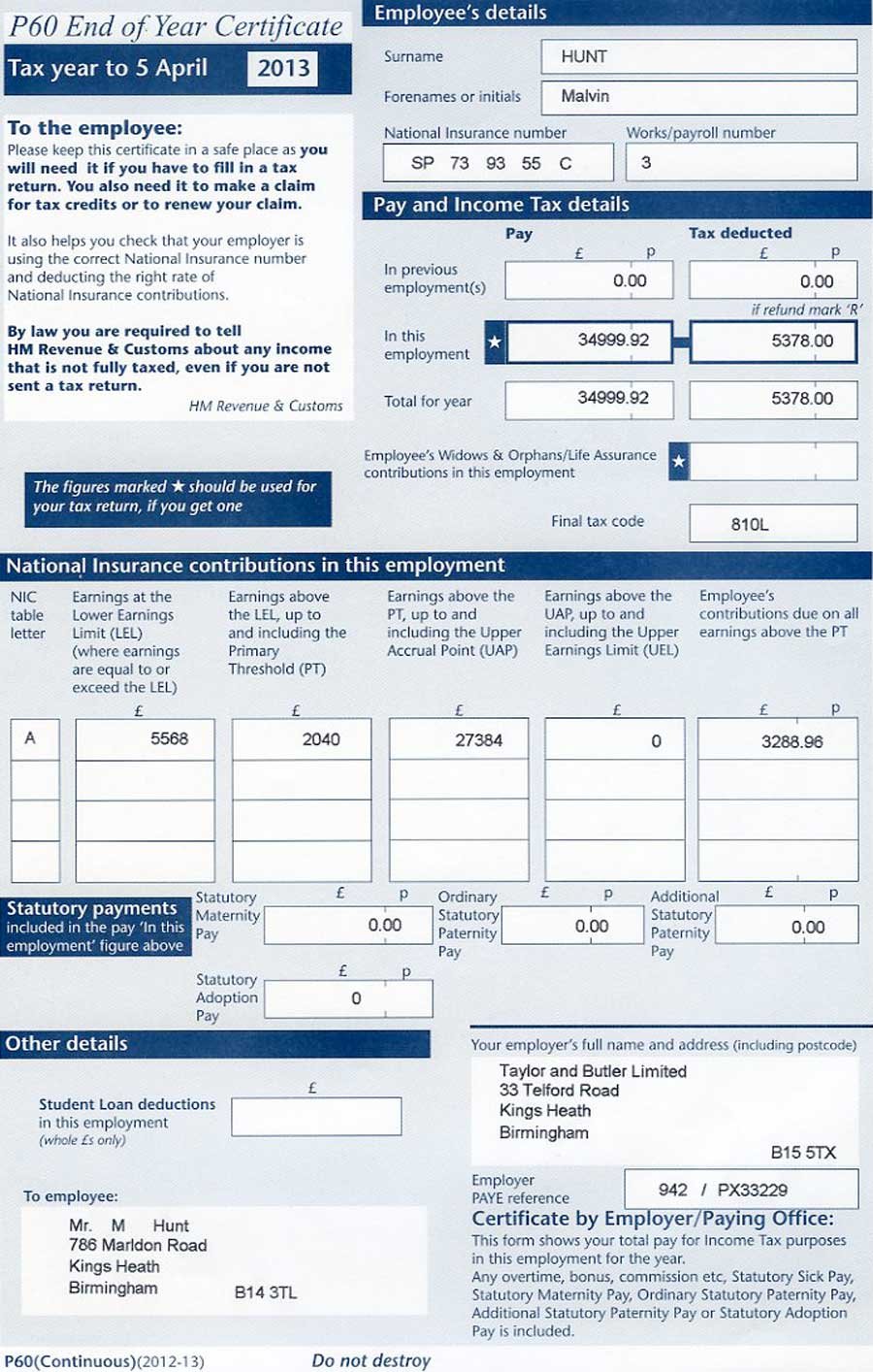
This is how the paper copy of a UK P60 form looks:
What a P60 Is and Why You Might Need a P60
A P60 is the end-of-year certificate your employer must give you by 31 May, summarising your total pay, tax, and National Insurance contributions for the tax year. It's an official record, which is exactly why a P60 is so often requested — banks, letting agents, and government bodies treat it as trusted proof of income.
What Information a P60 Contains
- Your total pay and tax deducted for the tax year
- Your National Insurance number and category
- Your employer's PAYE reference
- Any statutory pay (sick pay, maternity pay) included in the year
- Student loan deductions, if applicable
Common Reasons People Need a Replacement P60
Most requests for a replacement P60 fall into a handful of everyday situations: applying for a mortgage, renewing tax credits or Universal Credit evidence, proving income for a rental application, or completing a self-assessment tax return. If any of these apply to you, a P60 is usually accepted wherever the original would have been lost.
Why This Document Matters for Financial Applications
Lenders and letting agents rely on this certificate because it comes directly from a payroll system rather than being self-reported, which makes it harder to falsify than a bank statement or a handwritten income declaration. Mortgage underwriters in particular tend to ask for the last two or three years' worth of certificates, which is exactly why so many people end up searching for a way to recover one they've long since thrown away or lost during a house move. Tax credit and Universal Credit reviews work the same way — caseworkers use the figures on the form to cross-check what you've declared, and a missing copy can hold up a renewal for weeks if you don't act early. Because the underlying figures are already stored in your employer's payroll software, getting hold of a fresh copy is rarely about recreating lost data — it's simply about knowing who to contact and how quickly they can turn the request around.
How to Request a Replacement P60 From Your Employer
Your employer is legally required to keep PAYE records for at least three years, so in most cases requesting a replacement P60 is simply a matter of asking the right person.
Step-by-Step: Asking Your Current Employer for a Replacement P60
Before contacting payroll, check if your company uses a digital payroll portal such as Sage, ADP, BrightPay, or Xero. Most modern employers automatically upload digital e-P60s to these self-service systems, allowing you to view and download a P60 instantly without waiting for HR response times.
- Check your online employee portal or payroll app first to see if an e-P60 is available for direct download
- If self-service is not available, contact your HR or payroll department directly, ideally by email so you have a record of the request
- Specify the exact tax year you need — payroll systems store each year separately
- Ask for the document to be clearly marked "Duplicate" — this is standard practice and doesn't affect its validity
- Allow a few working days for payroll to generate and send the replacement P60
What If You've Left the Company That Issued Your P60?
You can still request one from a former employer — the three-year record-keeping obligation applies regardless of whether you still work there. Contact their HR or payroll team using any former employee channel, or check your old payslips for a payroll provider contact if HR is unresponsive.
A short, direct email tends to get the fastest response. You don't need to explain why you need the document — just be specific about the tax year and your employee reference. A simple template looks like this:
Subject: Request for a duplicate end-of-year certificate
Hi [Name], I recently misplaced my end-of-year tax certificate for the [2024/25] tax year and would be grateful if payroll could send me a duplicate copy. My employee number is [xxx] and my National Insurance number is [xxx]. Thank you for your help.
Keeping the request short and factual, with the tax year and reference numbers up front, is usually all it takes for payroll to locate the right record and reissue it without back-and-forth emails.
Data Protection & GDPR Tip: Your P60 and email request contain sensitive personal data, including your National Insurance number, earnings, and address. Always submit your request through your secure employee portal, or ensure you send emails from a secure address. Request that payroll send your replacement document via an encrypted PDF or secure portal rather than unencrypted email attachments.
Getting a Replacement P60 When Your Employer Can't Help
Sometimes a replacement P60 isn't possible through the usual route — the company may have closed, been sold, or simply stopped responding. In that case, HMRC becomes your next stop, even though it doesn't issue the P60 form itself.
Using Your Personal Tax Account or HMRC App for P60 Details
Your Personal Tax Account and the official HMRC Mobile App show your complete pay and tax history for previous tax years. You can view, download, or print an official summary of your income directly from your smartphone or desktop. This digital proof can often stand in for a P60 when dealing with lenders or letting agents who just need verification of your income and tax paid.
Contacting HMRC Directly for Replacement P60 Information
If you can't access your Personal Tax Account, you can write to HMRC and ask them to confirm your pay and tax details for a specific year. This isn't a formal replacement P60, but a written HMRC confirmation is widely accepted as an alternative. Full guidance on P60s, including what HMRC can and can't provide, is available on the official P60 guidance page.
Before you write in, it's worth gathering a few details so HMRC can locate your record on the first attempt rather than writing back to ask for more information. Having this ready tends to shave a week or more off the process:
- Your full name, current address, and date of birth
- Your National Insurance number
- The exact tax year (or years) you need details for
- Your former employer's name and, if you have it, their PAYE reference
- A note of why the information is needed, such as a mortgage or benefits review, so it can be prioritised correctly
Replacement P60 vs Other Documents: What Employers and Employees Should Know
It helps to understand how a P60 compares with the other routes available, so you can pick the fastest option for your situation rather than defaulting to the slowest one.
Replacement P60 for Self-Employed and Multiple Employers
If you're self-employed, you won't have a P60 at all — HMRC uses your Self Assessment tax return details instead. For mortgage applications, lenders will ask for an SA302 / Tax Calculation summary accompanied by a Tax Year Overview. If you have mixed employment and self-employment income (e.g., side hustles alongside a PAYE job), mortgage underwriters will evaluate both your SA302 calculations and your employer P60s to get a full picture of your total annual earnings.
If you had more than one employer during the tax year, you'll need a separate P60 from each one, as each employer only reports the pay and tax they handled. This trips people up more often than you'd expect — someone who changed jobs mid-year, or who held down two part-time roles alongside each other, may need to contact two different payroll teams rather than assuming one document covers the whole year. It's worth listing every employer you had during the relevant tax year before you start, so you're not missing a figure when a lender or caseworker adds everything up.
Employer Responsibilities When Issuing a Duplicate P60
Employers aren't penalised for issuing a replacement P60 — it's a routine administrative task, not a compliance issue. The only requirement is that the duplicate matches the original figures exactly and is clearly labelled as a copy.
| Method | Typical Timeframe | Cost | Best For |
|---|---|---|---|
| Replacement P60 from employer | 2–5 working days | Free | Anyone still in contact with their employer's HR/payroll |
| HMRC Personal Tax Account / App | Instant online | Free | Quick self-service proof of pay and tax |
| Written confirmation from HMRC | 2–3 weeks by post | Free | When the employer has closed or is unreachable |
Which route makes sense depends mostly on your deadline. If a lender needs proof within a few days, going straight to your current employer is almost always faster than waiting on a postal reply from HMRC. If you're not in a rush, or your former employer no longer exists, the Personal Tax Account is worth checking first simply because it costs you nothing but a few minutes online.
If none of the above options are workable in time, keep these alternative documents in mind — some lenders and agencies will accept them alongside, or instead of, a P60:
- Your most recent payslips covering the relevant tax year
- A P45 if you left the employer during that tax year
- An SA302 Tax Calculation & Tax Year Overview (for sole traders / mixed income)
- Bank statements showing regular salary payments
- A signed letter from your employer confirming annual earnings
Common Mistakes to Avoid When Chasing a Duplicate Certificate
A little preparation avoids most of the delays people run into, and a few of the same mistakes come up again and again.
Waiting Until the Last Minute
Mortgage applications and tax credit renewals often have hard deadlines, but payroll teams work through requests in the order they arrive. If you know a lender or agency will ask for proof of income, it's worth requesting the document as soon as you're aware of the deadline rather than a day or two before it's due.
Contacting the Wrong Department
General customer service or reception lines usually can't help with payroll paperwork and will simply forward your enquiry, adding days to the process. Going straight to HR or payroll, and naming the specific tax year you need, tends to get a faster result than a general enquiry through a switchboard or a generic contact form.
- Not specifying which tax year you need — payroll systems store each year as a separate record
- Assuming a closed company means the records are gone — administrators or successor firms often still hold them
- Forgetting to check your Personal Tax Account or HMRC App first, since it can save you the wait entirely
- Sending the request from an unencrypted personal email without your employee reference, which slows down verification and risks data privacy
Frequently Asked Questions
Can I get a replacement P60 from HMRC?
HMRC does not issue a replacement P60 form itself, because the P60 is generated and issued by your employer. However, HMRC can confirm the pay and tax details that would have appeared on your P60 through your Personal Tax Account or by written request, which most organisations accept as evidence in place of the original.
How long does it take to get a replacement P60?
A replacement P60 from a current employer is usually issued within a few working days. If you need to go through HMRC because your employer has closed down or cannot help, requesting confirmation of your pay and tax details can take two to three weeks by post.
Is a replacement P60 the same as the original?
A replacement P60 must contain exactly the same figures as the original and should be clearly marked 'Duplicate' by the employer. It carries the same legal standing for tax, mortgage, and benefit purposes as the original document.
Do employers have to keep P60 records?
Yes. Employers in the UK are legally required to keep PAYE records, including the information used to produce a P60, for at least three years after the end of the relevant tax year, which is why they are usually able to issue a replacement P60 on request.
Can I use a Personal Tax Account P60 for a mortgage application?
Many lenders will accept the pay and tax summary from your HMRC Personal Tax Account when a P60 is not available, but it is best to check with your lender first, as some still prefer an employer-issued P60 or a P45.
Losing a P60 is inconvenient, but rarely a dead end. In most cases, getting a fresh copy is just one email to payroll away — and when that route isn't open, your Personal Tax Account or a written request to HMRC will get you the proof you need. The key is starting the process as soon as you realise the original is missing, rather than waiting until a lender or caseworker's deadline is already close. Most people who plan ahead find the whole thing resolved within a week, with no lasting impact on whatever application or renewal prompted the search in the first place.