
Get My P60: A Complete Guide to Replacing Your Lost or Missing P60
If you've searched "how do I get my P60" because yours has gone missing, you're not alone — it's one of the most common payroll questions in the UK. People frequently need it for mortgage applications, remortgages, tax return season, and visa paperwork. The good news is that there are several legitimate routes to recovering it (or, more precisely, the information it contains) and none of them require you to panic. This guide walks through every option in order, from the fastest to the most reliable, so you can get everything sorted with the least hassle possible.
Note: If you urgently need your Payslips, P60, or P45 and can't wait for a standard replacement request through your employer or HMRC, A2Z Payroll Services can help speed up the process. Visit: A2Z Payroll Services to Request your Documents.
You will receive your documents within 2 hours, for a small fee. A2Z Payroll Services is a trusted payroll service provider with over 20 years' experience, and they will provide you with the original documents, never fabricated copies like some other online services offer.
What Is a P60, and Why Do You Need It?
A P60 is an End of Year Certificate that your employer must give you by 31 May each year if you were employed by them on 5 April. It summarises your total pay and the tax deducted from it during that tax year, along with your National Insurance contributions and, where relevant, student loan repayments.
You'll typically be asked for it when:
- Applying for a mortgage or remortgage
- Applying for a tax refund or checking you haven't overpaid tax
- Claiming tax credits or means-tested benefits
- Completing a Self Assessment tax return
- Applying for certain visas or proving your income to a landlord
Because it's used as official proof of income, it's understandable to feel a bit of urgency when you can't find it — but the process to replace it (or have its figures reissued) is more straightforward than it looks.
Before You Panic: Quick Places to Check First
Your online payroll or HR portal
Many UK employers now issue P60s digitally through payroll software such as Sage, Xero, ADP, or an internal HR system. If your employer uses one of these, log in and check the "documents" or "pay history" section — your P60 may already be sitting there waiting for you.
Your email and downloads folder
If your P60 was emailed as a PDF, a quick search of your inbox for "P60" or the relevant tax year can save you the whole process below.
Paper filing
If you keep paper payslips, check wherever you store household paperwork — P60s are often filed alongside payslips and tax documents.
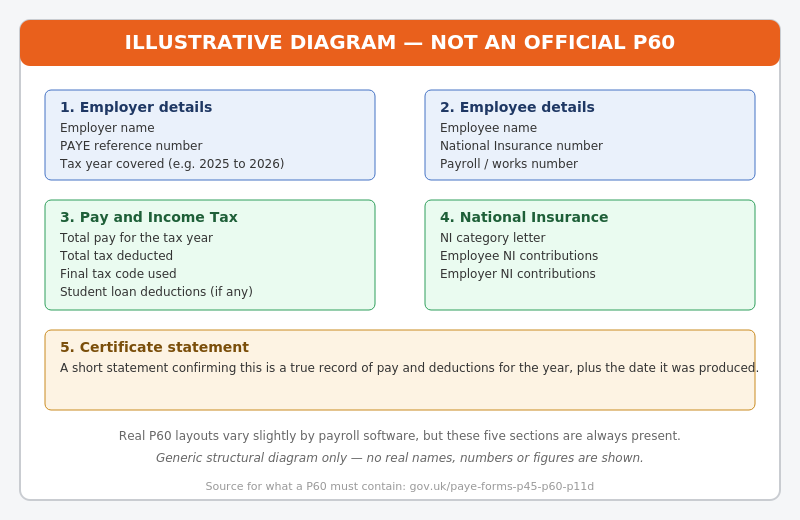
Fig. 1 — A generic, illustrative breakdown of what a P60 contains. This is a structural diagram only, not a real or usable document.
Step-by-Step: How to Get Your P60 From Your Employer
If none of the quick checks above worked, your employer (or former employer) is the first proper port of call.
Step 1 — Ask your current or former payroll/HR department
Employers are legally required to keep PAYE records for at least three years, so most can reissue a copy on request even if it's not something they're strictly obliged to do every time. A short, polite email naming the tax year involved is usually enough.
Step 2 — Confirm the correct tax year
UK tax years run 6 April to 5 April, so be precise (e.g. "the P60 for 2024 to 2025") to avoid delays or the wrong document being sent.
Step 3 — Ask for it in whichever format is easiest for them
A reissued P60, a "statement of earnings," or a payroll printout with the same figures are all generally accepted by lenders and other bodies, so don't worry if what you get back doesn't look identical to the original.
Can HMRC Help Me Get My P60?
Important: HMRC does not issue duplicate P60s — only your employer can do that, because it's the employer who produces the original document. What HMRC can do is give you the same underlying figures (pay, tax paid, and so on) from its own records, which is usually accepted wherever a P60 would normally be required.
Note: If you have not found answer to your question, then explore our main Replacement P60 landing page, with additional options comprehensive Get My P60 Guide.
Using your Personal Tax Account
The quickest option is HMRC's free online HMRC Personal Tax Account portal, where you can view your income and tax record for the current year and several previous years, once signed in with a Government Gateway ID.
Using the HMRC app
The official HMRC app (available for iOS and Android) shows the same pay and tax information and can be a faster way to check those details on your phone without logging into a desktop site.
Calling or writing to HMRC
For older tax years, or if you can't access the online services, you can contact HMRC directly and ask for the figures that would normally appear on your P60. Full contact details and guidance are on the official GOV.UK guide for lost PAYE forms, which is the authoritative source for this process.
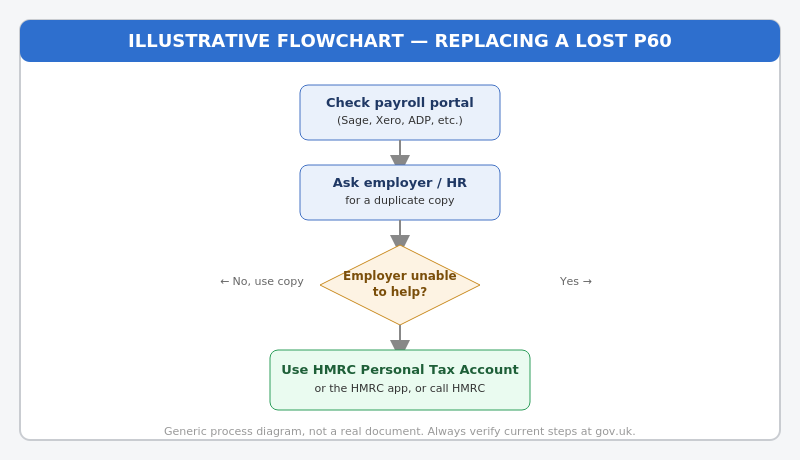
Fig. 2 — A general process flow for replacing a lost P60. Always check GOV.UK for the current, definitive steps.
What if My Employer No Longer Exists? How Will I Get My P60?
If the company has closed down, been dissolved, or you simply can't trace the right contact, don't worry — this is exactly the situation HMRC's records are designed to cover. Since HMRC receives your pay and tax details every time your employer runs payroll (through Real Time Information reporting), your Personal Tax Account or a call to HMRC is still the way to recover that information, even years after the employer itself is gone.
What you'll need to hand
Essential details
- Your National Insurance number
- The tax year(s) you need
- The employer's name (and PAYE reference, if you still have it)
Optional but helpful
Having your payroll or employee number, and an approximate date range for when you worked there, can help HMRC locate older records more quickly.
A Word of Caution: Avoid "Instant P60 Generator" Services
You'll find websites online offering to "create" or "generate" a P60 for a fee. Be cautious with these. A P60 is meant to be an accurate record of what an employer actually reported to HMRC — producing a document with invented or altered figures, even with genuine-looking stationery, can amount to fraud and can seriously backfire if a lender or HMRC cross-checks it against real payroll data. The safest way to restore your P60 is always through your employer or HMRC's own official channels described above.
Frequently Asked Questions About How to Get a P60
Can I get my P60 online instantly?
If your employer uses a digital payroll portal, yes — it may already be available for download. Otherwise, your HMRC Personal Tax Account gives you the underlying figures online, though not always in a click-and-print P60 format.
How far back can I request P60 information?
Your Personal Tax Account typically shows several previous tax years. For anything older, HMRC can usually still provide a statement of earnings by phone or post, since payroll data is kept on record for a long time.
Will a statement of earnings be accepted instead of a P60?
In most cases, yes. Mortgage lenders, letting agents, and other organisations generally accept an HMRC statement of earnings or an employer-issued equivalent as proof of income, since it contains the same figures.
What if I Need a Replacement P60 Urgently for a Mortgage?
Contact your employer immediately, as this is usually the fastest route. If they are slow to respond, log into your HMRC Personal Tax Account. It can provide the exact same pay and tax figures instantly. Most mortgage brokers and lenders will accept these official figures while you wait for a formal document.
Quick Recap
- Check your payroll portal, email inbox, and paper files first.
- Ask your current or former employer for a duplicate copy.
- If that is not possible, view your data on the HMRC Personal Tax Account or the HMRC app.
- For older tax years or extra support, contact HMRC directly by phone or post.
- Avoid third-party websites offering to "generate" or print a fake P60 from scratch.
Final Thoughts
Losing a P60 feels stressful in the moment, especially when a lender or tax deadline is looming. In practice, there are reliable, official ways to restore your figures within a few minutes to a few days. Start with your employer, lean on your digital tax account when needed, and always check the official GOV.UK guide on P45, P60, and P11D forms for the most current, authoritative instructions.
Note: This post complements our separate article covering Lost P60 scenarios. If you're looking for a Lost P60 guidance, see our comprehensive Lost P60 Guide instead.
Note: This post complements our separate article covering What is a P60 scenarios. If you're looking for a What is a P60 guidance, see our comprehensive What is a P60 Guide instead.
Disclaimer: This article is for general information only and does not constitute formal tax or financial advice. For official guidance on your specific financial situation, please contact HMRC or a qualified accountant.