
What Is a P60? The Complete UK Guide 2026, to Your End-of-Year Tax Form
Every year after 5 April, payroll software generates end-of-year certificates for active workers, leaving many people trying to decipher P60 and how to read it correctly. A major source of confusion on actual P60 forms is understanding how "In This Employment" figures differ from "Previous Employment" figures brought forward in the same tax year. Whether you need to understand the breakdown of your pay and tax, resolve missing paperwork, or handle compliance for employees, this guide details what a P60 contains, how to replace a lost copy, and how HMRC rules apply.
Note: If your Payslips, P60, or P45 are needed urgently and you don't have time for a standard replacement request via your employer or HMRC, A2Z Payroll Services can accelerate things for you. Visit: A2Z Payroll Services to Request your Documents.
Your documents will be with you within 2 hours, for a small fee. A2Z Payroll Services is a trusted payroll service provider with over 20 years' experience, and they will provide you with the original documents, never fabricated copies like some other online services offer.
Key Takeaways
- What is a P60 in one sentence? It's an end-of-year certificate from your employer showing your total pay, tax, and National Insurance for a single tax year.
- Only employees still working for an employer on 5 April receive a P60; it must arrive by 31 May.
- The form clearly separates "In This Employment" earnings from "Previous Employment" figures brought forward during that tax year.
- HMRC does not issue a P60 — only your employer can, and a lost one should be requested from them first.
- If your employer cannot help, HMRC's Personal Tax Account shows the same pay and tax figures for the current year and the previous four years, though printouts may be rejected by strict mortgage lenders unless backed up with official evidence.
- Self-employed workers never receive a P60 for sole trader income; mortgage lenders require an SA302 / Tax Calculation instead.
What Is a P60?
The plain-English answer to what is a P60 is straightforward: it is a certificate your employer gives you at the end of each tax year, summarising everything you were paid and everything that was deducted from that pay. The UK tax year runs from 6 April to 5 April, and the P60 covers that exact twelve-month period for a single employment. If you worked for more than one employer at the end of the tax year, you should receive a separate P60 from each of them. Nothing on the form is generated on the spot — every figure comes from payroll data your employer has already reported to HMRC throughout the year, which is one reason the answer to what is a P60 is really "a summary" rather than a standalone record.
What Information Appears on a P60
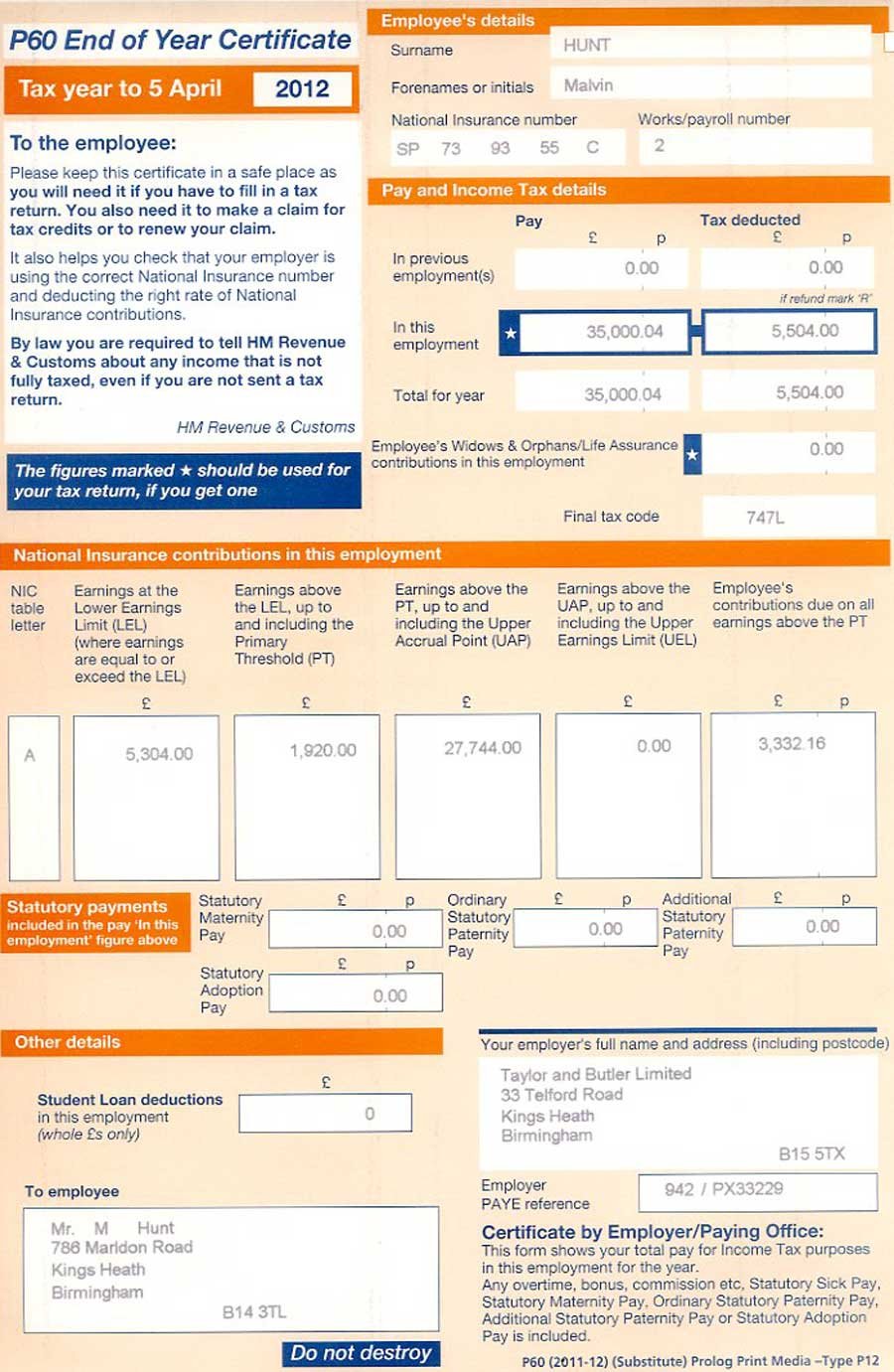
Understanding what is a P60 in practice means knowing how to read the exact boxes and figures listed on the certificate:
- In This Employment vs. Total for Year: This crucial distinction shows pay and tax from your current job alongside total figures that include pay carried over from a previous job via a P45. Lenders look at this to see your true pay rate with your current employer.
- Total pay before deductions: Gross pay processed through PAYE for the tax year. Company benefits-in-kind (like company cars or private healthcare) are reported separately on a P11D unless they are processed directly through payrolled benefits.
- Income Tax deducted: Total PAYE tax withheld from your earnings.
- National Insurance Contributions: Includes your National Insurance category letter (such as Category A for standard employees) and earnings subject to NI.
- Final tax code: Shows the code operating on payroll at year-end, such as 1257L.
- Student loan deductions: Itemises Plan 1, Plan 2, Plan 4, or Postgraduate loan repayments taken through payroll.
- Statutory payments: Lists statutory pay received during the year, including maternity (SMP), paternity (SPP), or sick pay (SSP).
P60 vs P45, P11D, and Payslips: Understanding the Differences
People often confuse the key UK payroll documents. Seeing how a P60 compares to a P45, a P11D, and a payslip helps clarify why different organisations ask for specific forms.
| Document | When It Is Issued | What It Covers | Main Purpose |
|---|---|---|---|
| P60 | Annually by 31 May for employees working on 5 April | Full tax year figures for a single employer | End-of-year tax proof, mortgage applications, tax checks |
| P45 | Whenever you leave a job partway through a tax year | Pay and tax in your current job up to your leaving date | Handed to a new employer so they can set your tax code |
| P11D | Annually by 6 July following the end of the tax year | Taxable company benefits, perks, and non-exempt expenses | Reports non-cash benefits (e.g. car, private medical) to HMRC |
| Payslip | Every payday (weekly, monthly, or fortnightly) | Single pay period earnings, deductions, and net pay | Itemises immediate pay and current tax period details |
Knowing what is a P60 versus what is a P45 or P11D matters most when changing jobs or assessing total income. While a P60 summarizes taxable cash pay, a P11D details non-payroll taxable benefits. Combining your P60 gross pay and P11D benefit totals gives your complete taxable income.
Most people only think seriously about P60 the moment someone asks them for one. Mortgage lenders and letting agents commonly request one or two years of P60s as proof of income. Accountants use the figures to complete a Self Assessment return for anyone with additional income. Employees reclaiming overpaid tax, checking for a P800 Tax Calculation tax refund from HMRC (or a Simple Assessment notice), or verifying their tax code rely on these figures. Visa applications and background checks ask for the same figures, making it vital to understand your P60 details early.
Pensioners, Directors & Special Cases
State Pension & Workplace Pension P60s
Receiving a P60 is not limited to active employment. If you draw a workplace or private pension, your pension provider acts as a PAYE operator and must send you a P60 every year by 31 May, detailing the taxable pension paid and tax deducted. However, the Department for Work and Pensions (DWP) does not issue a P60 for the State Pension, as State Pension is paid gross without tax deducted at source. State Pension income is verified via annual DWP entitlement letters instead.
Company Directors and Self-Employed Workers
If you are a company director drawing a salary through your business's PAYE scheme, your company must issue you a P60 at the end of the tax year for that salary. Dividend payments drawn from company profits are reported via Self Assessment and do not appear on a P60.
If you are self-employed as a sole trader or partner, you do not receive a P60 because your income is not processed through PAYE. When self-employed individuals apply for a mortgage, lenders will request an SA302 / Tax Calculation overview alongside an official HMRC Tax Year Overview instead of a P60.
What to Do If You Cannot Find Your P60
Ask Your Employer First
If you already understand what is a P60 and simply cannot locate yours, the fastest fix is to contact your current employer's payroll or HR team. Because payroll software generates every P60 from data already filed with HMRC, most employers can reissue a copy within minutes to a few working days. Larger employers with a self-service portal can often provide the document almost instantly, while smaller employers running payroll manually may need a day or two to pull the figures together.
- Check your staff portal or HR system first — many store documents under "pay history".
- Email payroll and ask for a duplicate P60 for the specific tax year you need.
- Confirm the reissued copy is labelled "duplicate" or "replacement".
- Allow extra time if your employer processes payroll manually.
If You've Left the Job or the Employer No Longer Exists
Employers must keep PAYE records for at least three years, so a former employer can usually still help even after you have left. If the business has closed altogether, HMRC still holds every figure that was reported through Real Time Information, meaning the underlying data behind P60 survives even when the company and the paperwork do not. This matters just as much for anyone trying to work out P60 they never received in the first place, since the same HMRC records can confirm whether one should have been issued at all.
Note: If you have not found answer to your question, then explore our main Replacement P60 landing page, with additional options comprehensive What is a P60 Guide.
Getting Your P60 Figures From HMRC
If your employer cannot help, HMRC's free Personal Tax Account holds the same pay and tax information a P60 would show, for the current year and the previous four. This route is often the quickest option outside office hours, since the Personal Tax Account and HMRC app are both available at any time, and neither requires waiting for a payroll team to respond.
Keep in mind that while your HMRC Personal Tax Account displays your official pay and tax figures, it provides a web summary or printout rather than a downloadable PDF replica of the original P60 form. Some strict mortgage lenders may reject an online printout as standalone proof unless supported by bank statements or an official HMRC Statement of Earnings.
Signing In to Your Personal Tax Account
- Sign in at the gov.uk Personal Tax Account using your Government Gateway ID.
- Select the PAYE section, then "Pay and tax history".
- View or download figures for the current tax year and the four years before it.
- Use the HMRC app for the same details on a phone.
Requesting Older Years by Phone
Call HMRC on 0300 200 3300 for a Statement of Earnings letter covering older years. HMRC never issues a P60 itself, and it will not post you a replacement form — it can only confirm the figures behind one. Many lenders, landlords, and letting agents accept that confirmation, or a full set of payslips covering the tax year, in place of the original document. It's a useful reminder that what P60 Form, in the end, is just a summary of figures HMRC already has on file.
| Method | What You Receive | Typical Timeframe | Best Suited To |
|---|---|---|---|
| Ask your employer | An official duplicate or replacement P60 | Same day to a few working days | Anyone who needs the exact original document |
| HMRC Personal Tax Account | Online figures for pay and tax, current year plus four previous years | Instant, once signed in | Quick checks and recent tax years |
| HMRC Statement of Earnings | A letter confirming pay and tax figures | Around 2 to 3 weeks by post | Older tax years or a closed employer |
For the official guidance covering all three PAYE year-end forms, see HMRC's own P60 Guidance page.
What Is a P60 From an Employer's Point of View
Employer Deadlines and Legal Duties
Employers carry the legal duty here, and understanding what is a P60 from a compliance angle avoids most disputes with staff later. Getting the year-end process right the first time is also far less work than fielding repeated requests for duplicates later in the year.
- Every employee still on the payroll on 5 April must receive a P60 by 31 May.
- Records supporting each P60 must be kept for at least three years.
- A corrected P60 should be marked "replacement" or accompanied by a letter explaining the change.
- Employers without payroll software capable of producing P60s can use HMRC's Basic PAYE Tools.
- Care and support employers, or those with exceptional circumstances, can apply to HMRC to be exempt from filing online.
Real Time Information (RTI) & Digital P60 Delivery
Behind every P60 is the employer's Real Time Information (RTI) reporting. The pay, tax, and National Insurance figures on an employee's P60 must align exactly with the final Full Payment Submission (FPS) or Employer Payment Summary (EPS) sent to HMRC for Month 12. Employers can distribute P60s on paper or electronically (e.g. via secure employee web portals or password-protected PDFs sent by email), provided employees have secure online access and the ability to print hard copies if needed.
Producing and Reissuing P60s
Modern payroll software generates every P60 automatically from year-end data already filed with HMRC, which is why most employers can regenerate a lost copy in a couple of clicks rather than typing figures up by hand. The reissued copy should always be clearly marked as a duplicate, so there is never any confusion about which version is the original. For an employer handling this for the first time, keeping a short internal note on what is a P60 and how corrections are handled is worth adding to the payroll calendar alongside the deadlines above.
Frequently Asked Questions
What is a P60 used for?
A P60 is most often used as proof of income for mortgages, loans, and rental applications, and to check that the right amount of tax was paid during the year. It is also used to complete a Self Assessment return where one is required. Anyone asking what is a P60 used for in a job application context should know it can also support visa applications and some pre-employment background checks.
What is a P60 I've never had one before?
If you have never received a P60, it usually means you were not employed on 5 April of that tax year, perhaps because you were self-employed, unemployed, or had already left a job before the tax year ended.
Do I get a P60 if I'm self-employed?
No. A P60 only applies to PAYE employees. Self-employed workers report their income and tax through Self Assessment instead, and have no equivalent year-end certificate.
What is the difference between a P60 and a P45?
A P45 covers pay up to the date you leave a job during the tax year. A P60 covers the whole tax year for anyone still employed on 5 April, issued once a year rather than when someone leaves.
Can I get my P60 if I've lost it?
Yes. Ask your current or former employer for a duplicate first. If they cannot help, your HMRC Personal Tax Account holds the same pay and tax figures for the current year and the previous four.
How long do employers have to keep P60 records?
Employers must keep the PAYE records behind each P60 for a minimum of three years after the end of the relevant tax year, so a duplicate is usually available on request.
Is a P60 the same as a payslip?
No. A payslip covers a single pay period, such as a week or a month, while a P60 summarises the entire tax year in one certificate. Understanding P60 versus a payslip helps explain why lenders often ask for the P60 rather than twelve months of payslips.
Conclusion
Understanding what is a P60 makes the whole document far less intimidating, whether you are looking at one for the first time or trying to replace a copy that has gone missing. It is simply an annual certificate of your pay, tax, and National Insurance, issued by your employer rather than HMRC, and due by 31 May each year. If yours has been lost, your employer is the fastest route back to a duplicate, and HMRC's Personal Tax Account is a reliable backup for the current year and the four before it. Once you know what P60 is and where the figures behind it actually live, a missing copy stops being a crisis and becomes a quick administrative fix. Keep any reissued copy somewhere safe with your other tax records, so the next time someone asks you for a P60, you can hand it over without a second thought.
Note: This post complements our separate article covering Replacement P60 scenarios. If you're looking for a Replacement P60 guidance, see our comprehensive Replacement P60 Guide instead.
Note: This post complements our separate article covering Get My P60 scenarios. If you're looking for a Get My P60 guidance, see our comprehensive Get My P60 Guide instead.