
Replacement P60
How to Get a P60 Form (Lost or Replacement Guide)
A P60 is one of the most critical tax documents you will receive in the UK. It summarizes your total taxable income and the exact amount of tax deducted from your pay during the tax year (6th April to 5th April).
If you are applying for a mortgage, proving your income for a loan, or claiming a tax refund, you will inevitably be asked to provide a copy. But what happens if you lost your original, or your employer never sent one?
This guide explains exactly how to get a replacement P60 quickly and legally.
- Request a Replacement from Your Current Employer
Your current employer is legally required to provide you with a P60 by 31st May if you were working for them on the final day of the tax year (5th April).
If you have lost your copy, your company’s payroll or HR department can easily generate a duplicate version for you.
- eP60 (Digital): Most modern workplaces use digital payroll portals (like Sage, IRIS, or BrightPay). Log into your staff portal to download your digital PDF copy instantly.
- Paper Copy: If your company processes payroll manually, ask your payroll administrator for a printed duplicate.
Note: Employers are only required to hold onto your payroll records for 3 years, so they may not be able to retrieve forms from a long time ago.
- Check Your Government Personal Tax Account
If your employer cannot assist you, or if you are looking for an older P60 from a previous tax year, you can find your exact earnings figures directly through HM Revenue & Customs (HMRC).
- Go to the official GOV.UK Personal Tax Account sign-in page.
- Log in using your Government Gateway ID (or create one using your National Insurance number and passport/P60 details).
- Navigate to the “Pay As You Earn (PAYE)” section.
- View your employment history and click on the specific tax year you require.
While HMRC does not let you print out a document that looks exactly like a traditional pink-and-blue P60, you can print a fully official “Employment History Summary” sheet. Banks, lenders, and mortgage brokers accept this document as valid proof of income.
- Contact HMRC Directly
If you cannot access the online portal, you can call HMRC directly to request a printed summary of your earnings and tax contributions.
- HMRC Income Tax Helpline: 0300 200 3300
- What you will need: Have your National Insurance number and your employer’s PAYE reference number ready before you call.
HMRC will post a formal letter to your home address detailing your financial figures. This process usually takes 10 to 14 working days, so plan well ahead if you are in the middle of a mortgage application.
The Ultimate Guide to the UK P60: What It Is and Why You Need It
If you’re employed in the UK, spring brings more than just blooming flowers—it brings a flurry of tax paperwork. Among the most critical documents you’ll receive is your P60. Whether you are applying for a mortgage, claiming a tax refund, or simply trying to understand your payslips, understanding this form is crucial.
What is a P60?
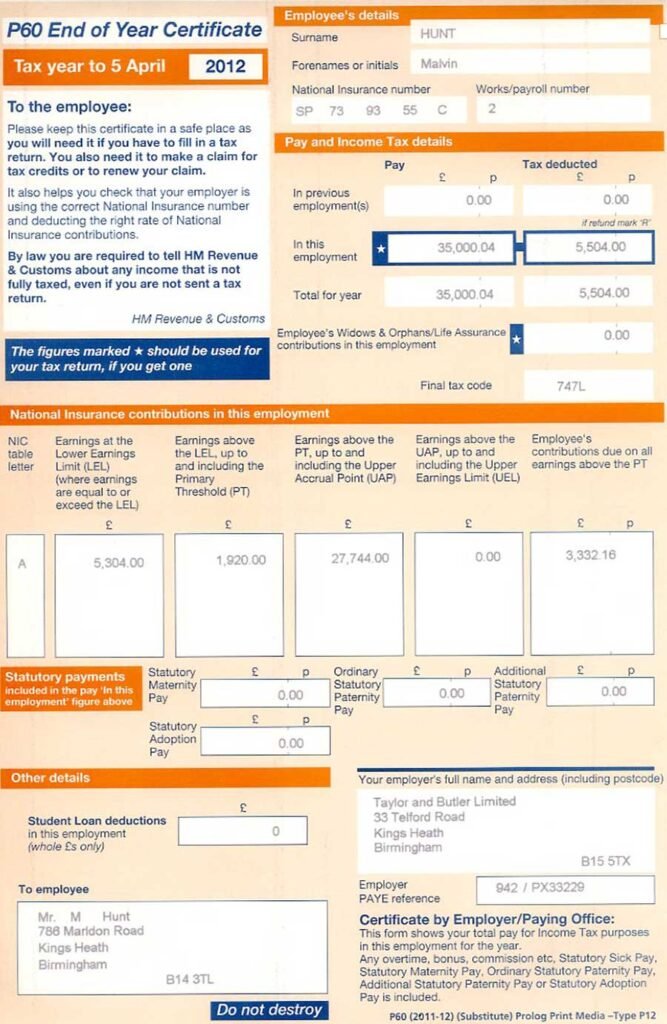
A P60, formally known as the End of Year Certificate, is a document issued to all employees in the UK by their employer. It summarizes your total pay and the deductions made from it during the tax year (which runs from 6 April to 5 April).
Why the P60 Matters
Your P60 is essentially a financial report card for the tax year. It proves exactly how much you earned and how much tax you paid to HM Revenue and Customs (HMRC). You will frequently be asked to provide this document when proving your income to third parties.
Who Receives a P60?
By law, your employer must provide you with a P60 if you are working for them on the final day of the tax year (5 April) and you are paid via the PAYE (Pay As You Earn) system. If you leave a job before April 5th, you will not receive a P60 from that employer (you will receive a P45 instead).
When and How Will You Receive It?
Timing is everything when it comes to tax documents. Employers operate under strict deadlines to get this information into your hands.
The Statutory Deadline
Employers are legally required to provide you with your P60 by 31 May following the end of the tax year. For example, the P60 for the tax year ending April 5, 2026, must be issued to you by May 31, 2026.
Digital vs. Paper Formats
In the modern digital age, many employers have moved away from physical paper documents. You may receive your P60 as a PDF via a secure employee portal or through an online payroll system. Regardless of the format, employers are still legally required to ensure you can easily view and print the document.
What Information is Included on a P60?
A P60 might look like a jumble of numbers and acronyms, but it is actually quite straightforward once you know what to look for.
Your Personal Details
At the top of the form, you will find your identifying information. This ensures the document is tied directly to you.
- Name and Address: Your current registered details.
- National Insurance (NI) Number: This is vital as it links your tax contributions to your HMRC record.
- Employer PAYE Reference: A unique code that identifies your employer to HMRC.
Financial Figures
The meat of the document lies in the figures. You will see columns or boxes detailing:
- Total Pay for the Year: Your total taxable earnings before any deductions.
- Total Tax Deducted: The exact amount of Income Tax your employer sent to HMRC on your behalf.
- Total NI Contributions: The National Insurance payments you made throughout the year.
- Statutory Payments: Any amounts for Statutory Sick Pay (SSP), Maternity Pay (SMP), etc., if applicable.
What Should You Do with Your P60?
Once you have your P60 in hand, it is important to handle it correctly so you aren’t left scrambling later.
Check for Errors
Don’t just file it away; read it first. Compare the figures on your P60 with the final payslip of the tax year. Ensure your National Insurance number is correct and that the total pay matches your expectations. If you spot an error, contact your payroll department immediately to request a corrected version.
Retain for Your Records
HMRC recommends keeping your P60s for at least 22 months after the end of the tax year to which they relate. However, many financial advisors suggest holding onto them for up to six years, as this is the standard time limit HMRC has to enquire into your tax affairs.
When Do You Need to Use Your P60?
Your P60 is a powerful piece of evidence for your personal finances. Here are the most common situations where you will need to produce it:
- Mortgage or Loan Applications
When you apply for a mortgage, lenders need proof of your income. They will almost certainly ask for your most recent P60 to verify your base salary and any additional bonuses or overtime that appear on your tax record.
- Claiming a Tax Refund
If you believe you have overpaid Income Tax, your P60 is the key to proving it. You can use the figures to calculate your total tax liability for the year and Claim a Tax Refund directly through HMRC.
- Disputing Tax Records
Occasionally, HMRC systems might show an incorrect record of your earnings. Your P60 is your ultimate proof of what you actually earned and the tax you paid, serving as an ironclad safeguard against administrative errors.
P60 vs. P45: What’s the Difference?
It is easy to confuse different tax forms, particularly ones with similar numbering. The two most commonly mixed up are the P60 and the P45.
The P45: Leaving a Job
You only receive a P45 when you leave an employer. It details your pay and tax deductions up to the date you leave the job. You hand parts of this document to your new employer or to the Jobcentre if you are claiming benefits.
The P60: Staying in Employment
As established, the P60 is for employees who are still working for their employer on April 5th. It is a yearly summary, not a document issued on departure.
What If You Lose Your P60?
Misplacing important documents happens to the best of us. If you can’t find your P60, there is no need to panic.
Contact Your Employer
Your employer’s payroll department is your first point of contact. By law, they keep records of your payroll history and can issue a replacement or duplicate P60.
Conclusion: Take Control of Your Tax Documents
Your UK P60 is more than just a bureaucratic formality; it is a vital summary of your financial life. By knowing when to expect it, understanding the numbers it contains, and storing it safely, you put yourself in the best possible position to manage your taxes, secure loans, and protect your hard-earned income. Keep this document accessible—you never know when you might need to prove exactly what you’ve earned!
England: Bath, Birmingham, Bradford, Brighton, Bristol, Cambridge, Canterbury, Carlisle, Chelmsford, Chester, Chichester, Colchester, Coventry, Derby, Doncaster, Durham, Ely, Exeter, Gloucester, Hereford, Hove, Kingston upon Hull, Lancaster, Leeds, Leicester, Lichfield, Lincoln, Liverpool, London, Manchester, Milton Keynes, Newcastle upon Tyne, Norwich, Nottingham, Oxford, Peterborough, Plymouth, Portsmouth, Preston, Ripon, Salford, Salisbury, Sheffield, Southampton, Southend-on-Sea, St Albans, Stoke-on-Trent, Sunderland, Truro, Wakefield, Wells, Westminster, Winchester, Wolverhampton, Worcester, York. Scotland: Aberdeen, Dundee, Dunfermline, Edinburgh, Glasgow, Inverness, Perth, Stirling. Wales: Bangor, Cardiff, Newport, St Asaph, St Davids, Swansea, Wrexham. Northern: Ireland, Armagh, Bangor, Belfast, Lisburn, Londonderry (Derry), Newry