
Lost P60? Here's How to Get a Replacement (Complete UK Guide)
It's the night before a mortgage appointment, a tax return deadline, or a benefits claim — and you suddenly realise you have no idea where your lost P60 is. You're not alone: it's one of the most common payroll documents people misplace, precisely because it only turns up once a year. The good news is that a lost P60 is rarely a dead end. In this guide, you'll learn exactly who to contact, what HMRC can and can't do, and what to use instead if a replacement isn't possible in time.
- What Is a P60 and Why Does It Matter?
- What to Do If You've Lost Your P60
- Can HMRC Give Me a New P60?
- Lost P60 for a Previous Tax Year
- Need Your P60 for a Specific Reason?
- How to Avoid Losing Your P60 Again
- Employers: Your Legal Responsibilities
- What a P60 Looks Like (Samples)
- Frequently Asked Questions
What Is a P60 and Why Does It Matter?
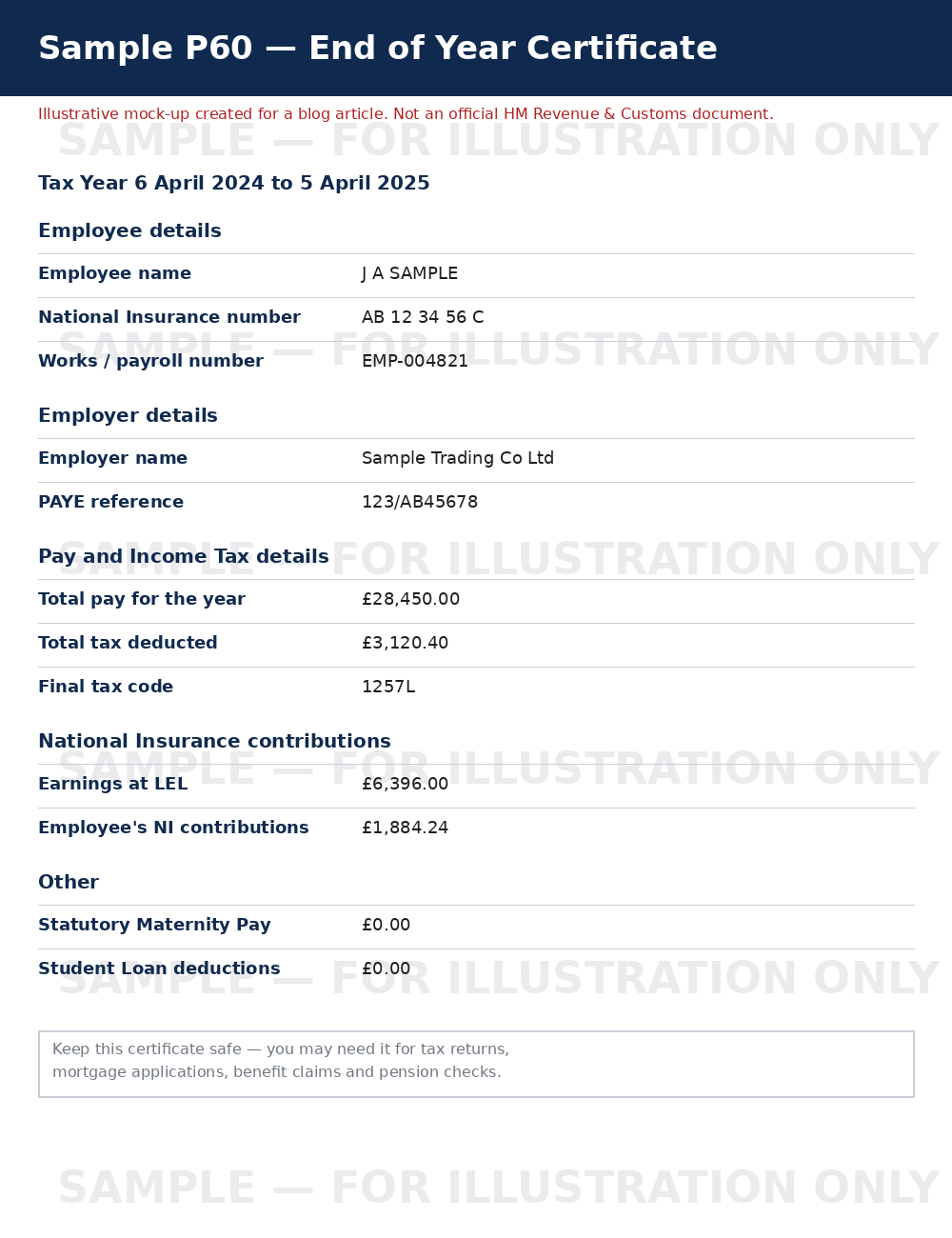
A P60 is an official end-of-year summary showing the total pay you received and the total tax and National Insurance deducted during a UK tax year (6 April to 5 April). It's issued automatically by your employer if you were employed on the last day of the tax year — you don't need to request it.
What Information Does a P60 Show?
| Field | What It Tells You |
|---|---|
| Total pay for the year | Your gross earnings from that employer for the tax year |
| Total tax deducted | The Income Tax taken off through PAYE |
| Final tax code | The tax code applied in your last pay period of the year |
| National Insurance contributions | Employee NI deducted, broken down by earnings band |
| Student Loan / Statutory Pay deductions | Any repayments or statutory payments made, if applicable |
Who Issues a P60 and When?
Your employer must give you a P60 (on paper or electronically) by 31 May following the end of the tax year. If you have more than one job, you should receive a separate P60 from each employer you were still working for on 5 April.
What to Do If You've Lost Your P60
Losing a P60 is common, and there's a clear order of steps to try before assuming you're stuck.
Step 1: Check Your Email and Payslip Portal First
- Search your email inbox for "P60" — many employers send it as a PDF attachment.
- Log in to your employer's payroll or HR self-service portal (e.g. Workday, Sage, BambooHR), where digital copies of a P60 are often archived.
- Check any cloud storage or downloads folder where you may have saved it previously.
Step 2: Ask Your Current Employer for a Replacement
If you're still working for the same business, contact payroll or HR to report a lost P60. Under Regulation 67 of the PAYE Regulations 2003, employers are only mandated to issue an original P60 once. However, almost all employers will happily generate a secondary copy for free, clearly marked as a "Replacement" or "Duplicate" to comply with HMRC guidelines.
Step 3: What If You've Left the Employer or They Refuse?
- Former Employees: Contact the payroll department directly. Even if you've left, payroll systems retain this data. (If you were paid through an umbrella company as a contractor, contact the umbrella provider's payroll desk).
- Employer Refusals: If an employer refuses to help with a lost P60, remind them that they are legally required to retain PAYE records for 3 years. They cannot charge you a fee to supply your statutory earnings data.
- Written Request: Always send a formal email listing your full name, National Insurance number, employee ID, and the relevant tax year to speed up retrieval.
Step 4: Access HMRC Digital Services (Online or App)
If your employer is unhelpful, you can access your earnings records directly through HMRC:
- Sign in to your HMRC Personal Tax Account using your Government Gateway ID, or open the official HMRC Mobile App (iOS/Android).
- Navigate to PAYE Income and Tax History.
- Select the relevant tax year to view or download a complete breakdown of gross pay and tax paid.
While this printout is not a physical P60 form, it pulls directly from Real-Time Information (RTI) reported by your employer and is legally accepted by almost all UK financial institutions.
Can HMRC Give Me a New P60?
What HMRC Can and Cannot Do
This is a common misconception: HMRC does not issue P60s, and it cannot print or post you a replacement copy, because the form is generated and issued by your employer's payroll system, not by HMRC directly.
How to Get a Statement of Earnings from HMRC Instead
What HMRC can do if you have lost your P60 is provide an official Statement of Earnings letter. This document confirms your pay and tax deducted for any chosen tax year. You can request this by calling HMRC directly on 0300 200 3300 (have your National Insurance number handy). It typically arrives by post within 10 working days and serves as an official substitute for mortgage applications or benefit reviews. See the official guidance on P45, P60 and P11D forms on GOV.UK for full contact options.
Lost P60 for a Previous Tax Year — What Are Your Options?
Employer Record-Keeping Rules (How Long They Must Keep P60 Records)
UK employers are legally required to retain PAYE records for at least 3 years from the end of the tax year they relate to. In practice, most payroll systems keep records for much longer, so requesting a duplicate for a lost P60 from the last 3–6 years is often still possible.
| Scenario | Likely Source for a Replacement |
|---|---|
| Lost P60 from this year, still employed there | Employer payroll/HR — request a duplicate |
| Lost P60, no longer employed there | Former employer's HR/payroll, or HMRC Statement of Earnings |
| Lost P60 from 3+ years ago | HMRC Personal Tax Account or Statement of Earnings |
| Employer has closed down | HMRC Statement of Earnings |
What If the Employer No Longer Exists?
If the business has closed, gone into liquidation, or dissolved, you will not be able to obtain a duplicate from payroll. In this situation, HMRC is your ultimate fallback. Because employers submit monthly Real-Time Information (RTI) to HMRC, the tax office holds full records of your historical earnings even if the company no longer exists.
Do You Need Your P60 for a Specific Reason? Here's What to Do Instead
Applying for a Mortgage
Most UK lenders ask for 2–3 years of P60s. If you are dealing with a lost P60, contact your mortgage broker immediately. Lenders will readily accept your final March payslip showing year-to-date totals, an HMRC Statement of Earnings, or a PDF download from your HMRC Personal Tax Account.
Filing a Self-Assessment Tax Return
Your P60 figures help you complete the employment section of a Self Assessment return. If you have lost P60, simply log into your Personal Tax Account — HMRC automatically populates your employment income and tax paid figures into your online Self Assessment return.
Claiming Tax Credits or Benefits
Benefits offices (including Universal Credit reviews) accept a Statement of Earnings from HMRC or a written confirmation letter from your employer's HR department.
Checking If You've Overpaid Tax
If your goal is simply to check whether you've paid the right amount of tax, a lost P60 won't hold you back — your Personal Tax Account calculates tax overpayments automatically and allows you to claim a refund online.
How to Avoid Losing Your P60 Again
Digital Storage Tips
- Save a PDF copy in a clearly labelled cloud folder (e.g. "Payslips & P60s") as soon as you receive it.
- Back it up in two places — cloud storage plus a personal email — in case one account becomes inaccessible.
- Rename the file with the tax year and employer name so it's easy to search for if you ever worry about a losing P60 in future years.
How Long Should You Keep a P60?
As a general rule, keep each P60 for at least 22 months after the end of the tax year it covers (longer if you're self-employed or under HMRC enquiry), since it may be needed for tax, pension, or benefit checks well after the year has ended.
Employers: Your Legal Responsibilities for Issuing and Reissuing P60s
Deadline for Issuing P60s
As an employer, you must give a P60 to every employee on your payroll on 5 April, by 31 May of the same year — whether on paper or in an approved digital format.
Rules on Reissuing a Duplicate P60
- There's no legal limit on how many times you can reissue duplicate data — just ensure it's clearly marked "Duplicate" or "Replacement" to avoid confusion with the original.
- Keep the underlying payroll data for at least 3 years, as required under PAYE record-keeping rules.
- If your payroll is outsourced, confirm with your provider how far back they can pull historical data in case an employee reports a lost P60.
What a P60 Looks Like (Sample Illustrations)
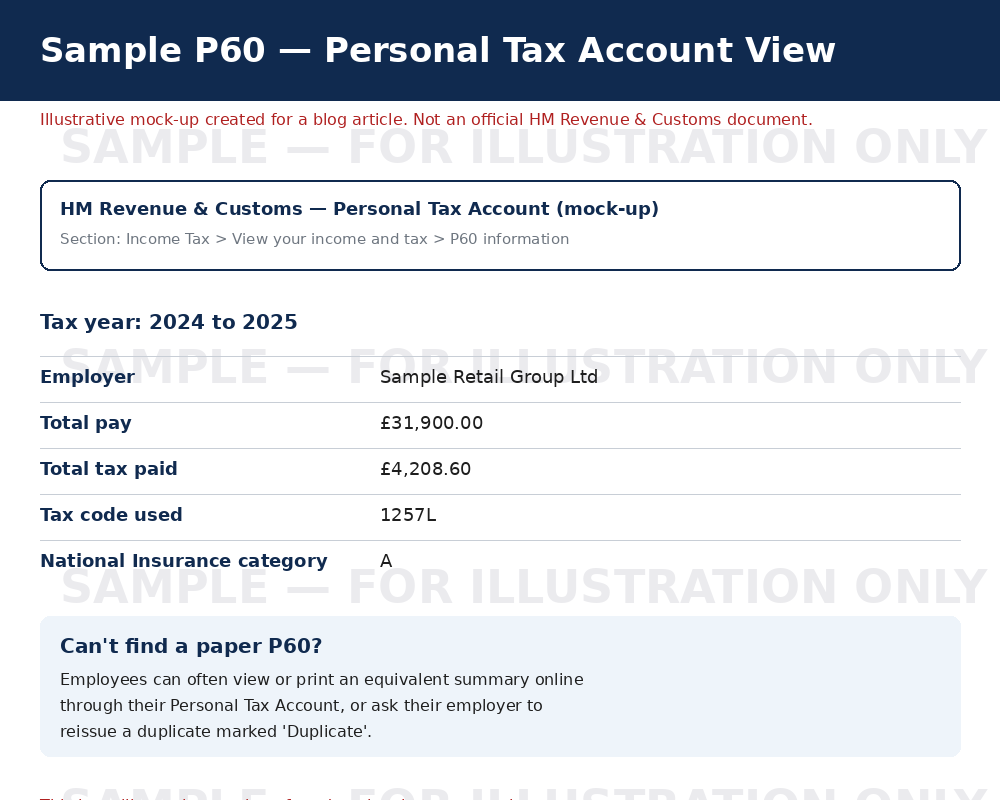
To help you recognise the layout and the information a P60 typically includes, here are two illustrative examples — one styled as a traditional paper certificate, and one styled as an online summary. These are mock-ups created for this guide and do not represent an official HMRC or payroll document.
Frequently Asked Questions
What should I do if I've lost my P60?
Start by checking your email and any online payroll portal, since many employers issue P60s digitally. If it's not there, ask your employer's payroll or HR team for a replacement copy. If you've left the company, contact its HR department directly. If the employer no longer exists, request a Statement of Earnings from HMRC instead.
Can I get a copy of my P60 from HMRC?
Not a duplicate of the original form — that's issued by your employer, not HMRC. However, HMRC can provide an official Statement of Earnings showing the exact same pay and tax figures, which is widely accepted as an alternative.
How long do employers have to keep P60 records?
At least 3 years from the end of the relevant tax year, under PAYE record-keeping rules — though many employers keep records for considerably longer.
Can I view my P60 information online?
Yes. Your Personal Tax Account on the HMRC website and the official HMRC Mobile App show your pay and tax details for current and previous tax years.
What can I use instead of a lost P60?
Your final payslip of the tax year (March), an HMRC Statement of Earnings, or your Personal Tax Account record are all commonly accepted alternatives — always check with the specific organisation first.
Is it illegal for an employer to refuse to reissue a P60?
Under Regulation 67 of the PAYE Regulations 2003, employers aren't legally required to reissue the exact paper form, but they must retain the payroll data and can provide a replacement statement. They cannot charge a fee for supplying this information.
Key Takeaways
| If you... | Do this |
|---|---|
| Still work for the employer | Request a duplicate/replacement P60 from payroll/HR |
| Left the employer | Contact former HR/payroll, or request an HMRC Statement of Earnings |
| Need it urgently for a lender or agency | Ask if a Statement of Earnings or payslips will be accepted instead |
| Just need the figures | Check your HMRC Personal Tax Account or HMRC App |
This guide is for general information only and isn't a substitute for official advice from HMRC or a qualified accountant for your specific circumstances.